Celum Schnittstelle
Upload assets to Celum
There are 9 steps to be done:
-
- Step 1: Checks if the Celum submission collection exists for the project; creates it if not.
-
- Steps 2-5: Checks if the folder-hierarchy exist; creates it if not.
-
- Step 6: Obtains an upload handle and URL from Celum.
-
- Step 7: Uploads the file to Celum.
-
- Step 8: Creates an asset in Celum using the upload handle.
-
- Step 9: Assign the metadata from a project to that asset Also the resulting asset id can be assigned to a project after then.
Submission Collection
Each Submission Id will be linked in Celum to
Submission/Submission-ID
Submission Inbox Folder Hierarchy
For each Submission this Folder Structure will be used:
Folder/Submissions Inbox/GDA/2026/GDA2026-123456
The right part beginning with "GDA", in the example, will be created dynamically if not exists. Some Ids are stored in our Award data-model and Project data-model.
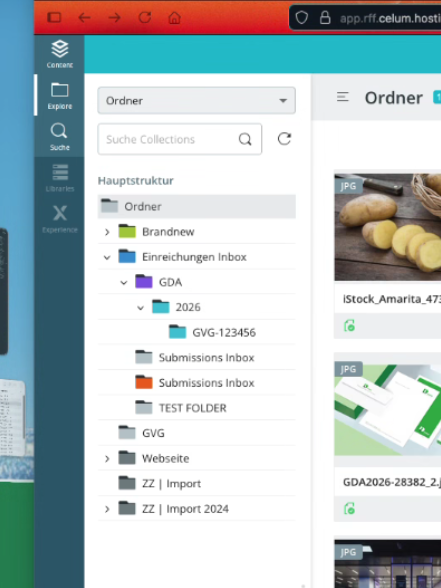
This hierarchy is created on submission.
Extensions
lns_celum_api, lns_celujm_files, lns_celum_articles